Bolt.new Review: I Built a Working App in My Browser, No Code, No Install
Every AI coding tool I’ve reviewed so far has required some kind of setup. Download this, install that, open a terminal. For someone who doesn’t code, that’s already a wall before you’ve even started.
Bolt.new has none of that. You open a website, type what you want, and it builds it. In your browser. With a working database that saves your data. And a button to put it on the internet when you’re done.
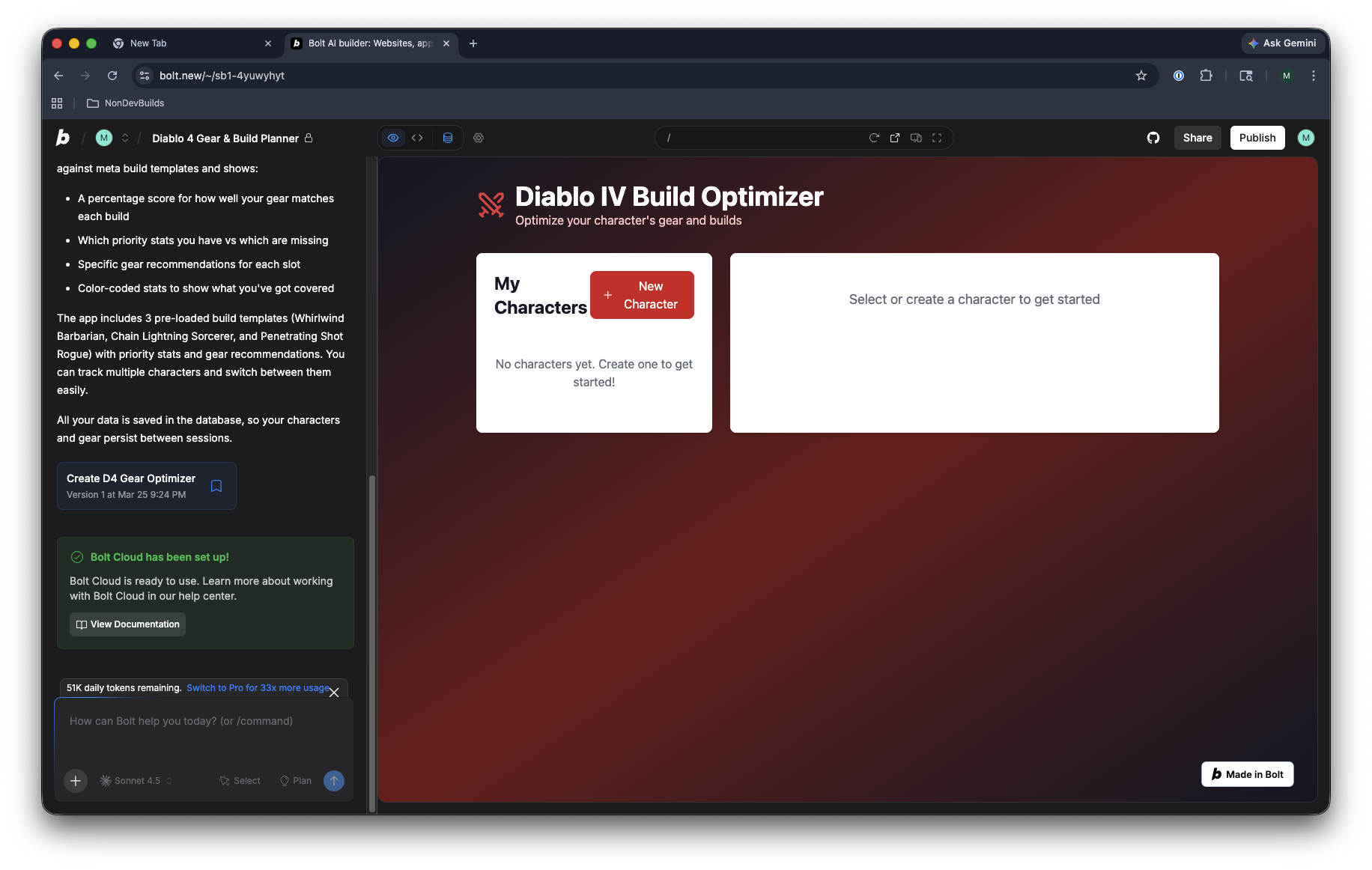
I tested it by building something I’d actually use: a Diablo 4 gear optimizer that tells you how close your build is to the meta. Here’s how it went.
What Is Bolt.new?
Bolt.new is a browser-based AI app builder. You describe what you want in plain English, and it writes all the code, runs it, and shows you a live preview, all inside one browser tab. No downloads, no terminal, no setup.
It’s made by StackBlitz, and it uses AI (specifically Claude, made by Anthropic) to generate the code behind the scenes. You never see or touch the code unless you want to.
Unlike tools that require you to download software and manage files on your computer, Bolt handles everything: the code, the database (where your data gets saved), the hosting (where the app lives on the internet), and the deployment (actually putting it online). You never touch a file or run a command.
The Test
I wanted to test Bolt with something more complex than a basic webpage. I play Diablo 4, and I’ve always wanted a tool where I can input my gear and see how it compares to the best builds. So I typed this:
“I play Diablo 4 and want something where I can put in what gear I have and it tells me how to improve or a complete build of a character”
This is deliberately vague. I didn’t mention anything technical. I wanted to see what Bolt would do with a real, messy, human request.
What Bolt Built
It went way beyond what I expected.
Before writing any code, Bolt showed me a 5-step plan in the left panel:
- Set up a database to store characters, gear, and build templates
- Build the screen for inputting gear across all equipment slots
- Create build templates with recommended stats and gear
- Add logic to compare your gear against the recommended builds
- Run the whole thing to make sure it works
About five minutes later, I had a working app with:
- Character creation: name, class (Barbarian, Sorcerer, Rogue, etc.), and level
- 10 equipment slots: Helmet, Chest, Gloves, Pants, Boots, Weapon, Offhand, Amulet, and two Rings
- Gear editing: click any slot to add your item with stats like Strength, Intelligence, Willpower, and Dexterity
- 3 pre-loaded build templates: Whirlwind Barbarian, Chain Lightning Sorcerer, and Penetrating Shot Rogue
- A percentage match score: shows how close your gear is to the recommended build
- Color-coded stats: green for stats that match, red for what you’re missing
- Specific gear recommendations for each slot
The whole thing had a dark red and black theme that actually felt like it belonged in the Diablo universe. Not just a generic white page with some text fields. And it all saves to a real database: close the tab, come back later, and your characters and gear are still there.
The one problem: every stat had to be typed in manually. With 10 gear slots and roughly 8 stats each, that’s a lot of typing. So I asked Bolt to fix it.
Asking Bolt to Improve It
I typed: “Can you add a way to select stats from a dropdown instead of typing them manually, and add common Diablo 4 item bases to pick from?”
Bolt planned it out in 4 steps, built it, and a few minutes later I had:
- Item base dropdowns: pick from common Diablo 4 items like Crowns, Circlets, Swords, and Axes depending on the gear slot
- Stat dropdowns: instead of typing “Strength,” you just select it from a list and enter the number
- A custom name field: for when you want to call your helmet “Legendary Crown of Awesomeness”
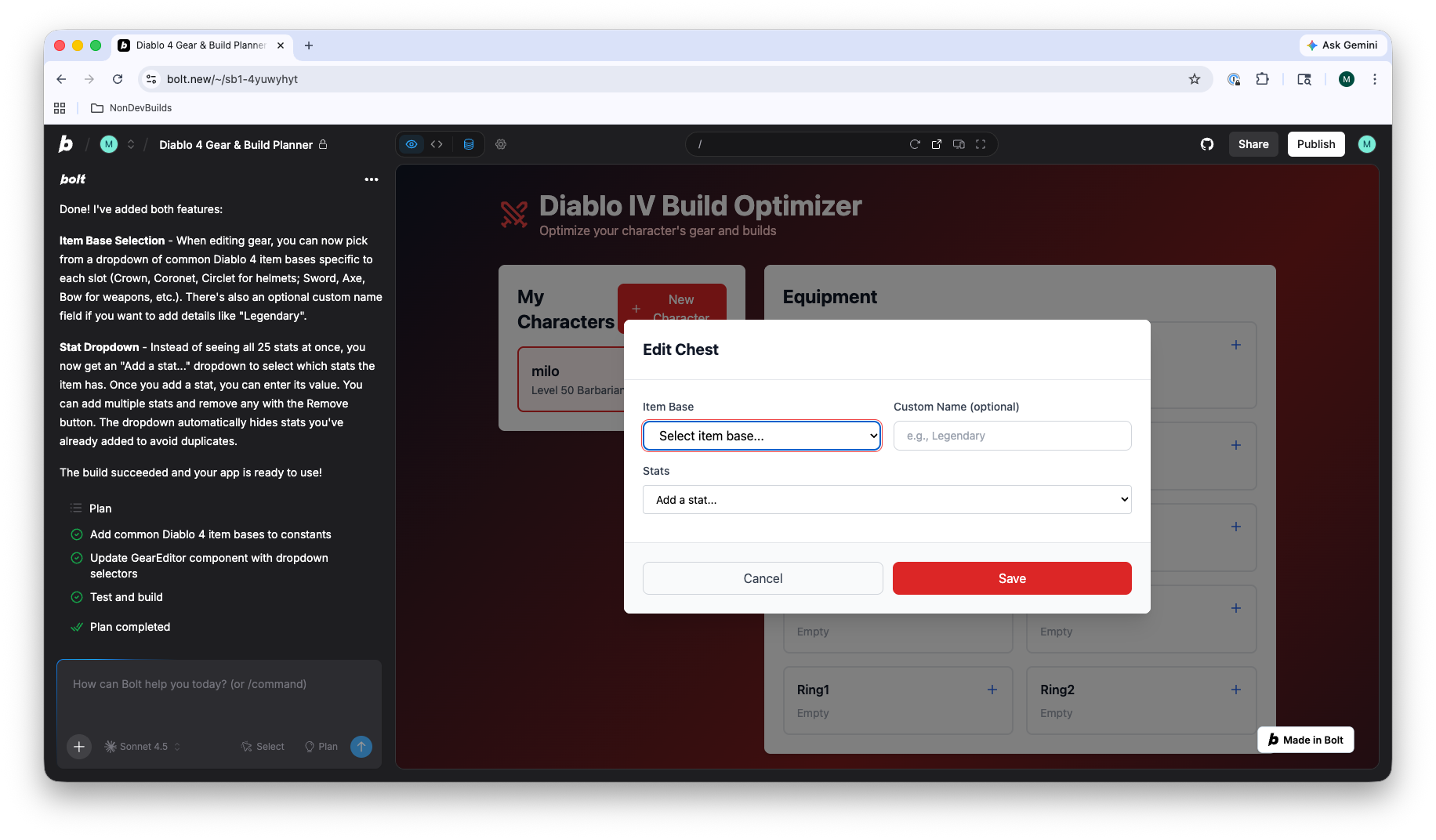
This is where Bolt really impressed me. It didn’t just add generic dropdowns. It understood what I was building. It knew which item types go with which gear slots, it pre-loaded stat options that actually exist in Diablo 4, and it automatically hid stats you’d already added so you couldn’t pick the same one twice.
Putting It on the Internet
When I hit the Publish button, Bolt did something unexpected. It flagged 6 security issues before letting me deploy. It showed a Security Audit page warning that the database was too open, meaning anyone on the internet could potentially read or delete other people’s data.
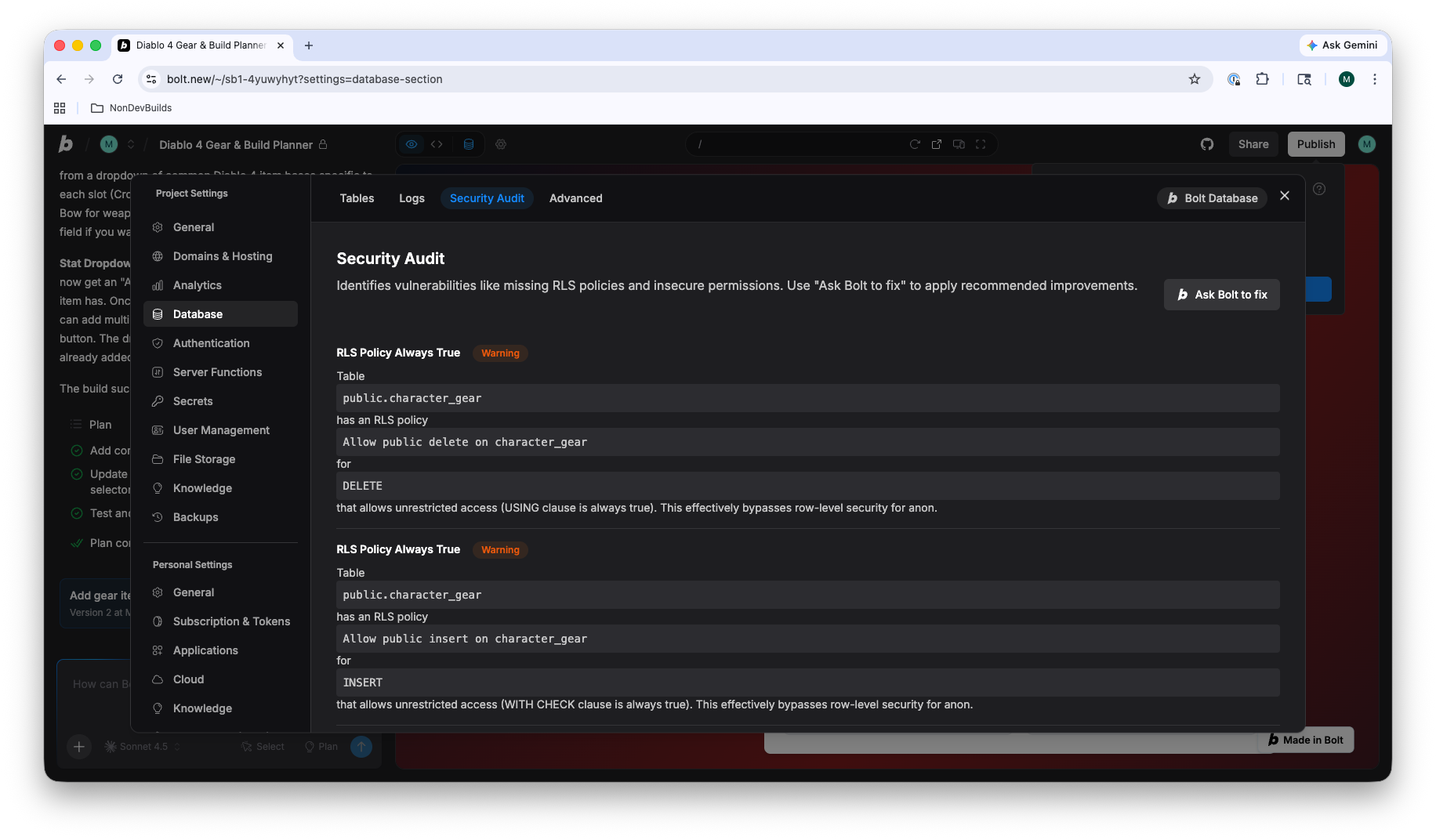
There was an “Ask Bolt to fix” button. I clicked it, and it automatically fixed 4 of the 6 issues. The remaining 2 were still flagged as warnings, but Bolt let me publish anyway.
The app went live at a Bolt-hosted URL in seconds. No domain setup, no hosting account, no configuration. Just click Publish and it’s on the internet. I appreciated that Bolt caught security issues at all. Most people (including me) wouldn’t have known to check for that.
The Free Tier Wall
Here’s the catch. On the first day of testing, I built the initial app and tried the follow-up prompt to add dropdowns, and got cut off. Daily limit reached. A message popped up showing the pricing tiers, and I was done for the day.
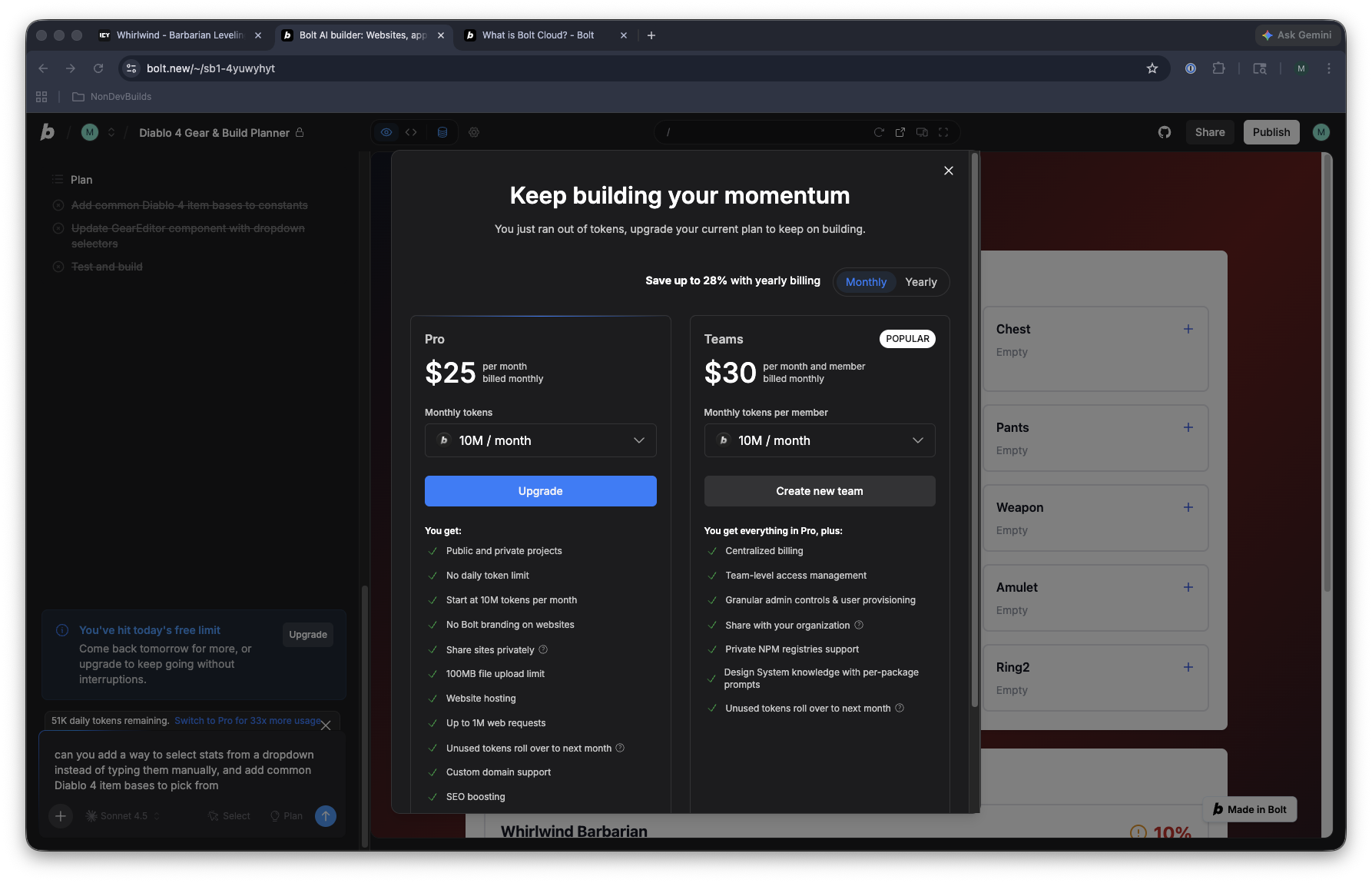
I had to come back the next day to finish testing the improvements and the deploy.
The free tier gives you a daily limit on how much the AI can do. One complex build plus one follow-up was enough to hit it. If you’re refining a project (which you will be, because nothing is perfect on the first try), you’ll hit this wall constantly.
Pricing
| Plan | Price | What You Get |
|---|---|---|
| Free | $0 | AI-powered builds, daily limit, Bolt branding on your app |
| Pro | $25/mo | Way more usage, no daily limit, no branding, hosting, custom web addresses |
| Teams | $30/mo per person | Everything in Pro + team collaboration |
The free tier is enough to see if Bolt is for you. But if you’re building anything real, you’ll need Pro.
What I Liked
- Zero friction to start. Open a website, type what you want, get a working app. Nothing to install, nothing to configure. This is the biggest advantage for non-developers.
- It thinks big. A vague prompt produced a full app with a database and three pre-built templates. Not just a basic webpage.
- Smart follow-ups. When I asked for dropdowns, it didn’t just add generic menus. It knew which items belong in which gear slots and which stats exist in Diablo 4.
- Built-in security check. It caught database security issues before I published. Most people wouldn’t think to check for that.
- One-click publishing. From prompt to a live app on the internet in minutes. That’s the dream.
What I Didn’t Like
- Free tier runs out fast. One complex build per day. If it’s not perfect (and it won’t be), you’re stuck until tomorrow. This kills the back-and-forth that makes AI tools useful.
- Manual data entry was tedious. Before the follow-up fix, entering stats for every gear slot was painful. The app needed the dropdowns from the start.
- No preview before committing. You can’t see what it’s going to build before it uses your daily limit. You’re going in blind every time.
- Didn’t fix everything. The security auto-fix handled 4 of 6 issues but left 2 unfixed. It still let me publish, which is convenient but means the app isn’t fully locked down.
The Verdict
Non-dev friendliness: 8/10
Bolt.new is the closest thing to “describe what you want and get a working app” that I’ve used. Opening a website is easier than installing software, and having the publish button built in means you can actually show people what you made, not just have it sitting on your computer.
The free tier is the main problem. AI tools are useful because you can try things, see what happens, and adjust. Bolt’s daily limit breaks that cycle. You get one real attempt per day, and if it’s not what you wanted, you wait until tomorrow.
If you’re willing to pay $25/month, Bolt is an excellent choice for non-developers who want to build real web apps. If you’re on the free tier, it’s a taste of what’s possible that runs out of gas fast.
Who should use Bolt.new:
- You want a working app without installing anything
- You’re fine with Bolt hosting your project
- You have a clear idea of what you want (so you don’t waste your daily limit guessing)
- You’re willing to pay $25/month for serious projects
Who should look elsewhere:
- You want to keep tweaking without hitting a daily wall
- You want to keep your project files on your own computer
- You need to work without an internet connection
Tools Mentioned
- Bolt.new: browser-based AI app builder