I Built My Brother an Artist's Portfolio He Can Update Himself
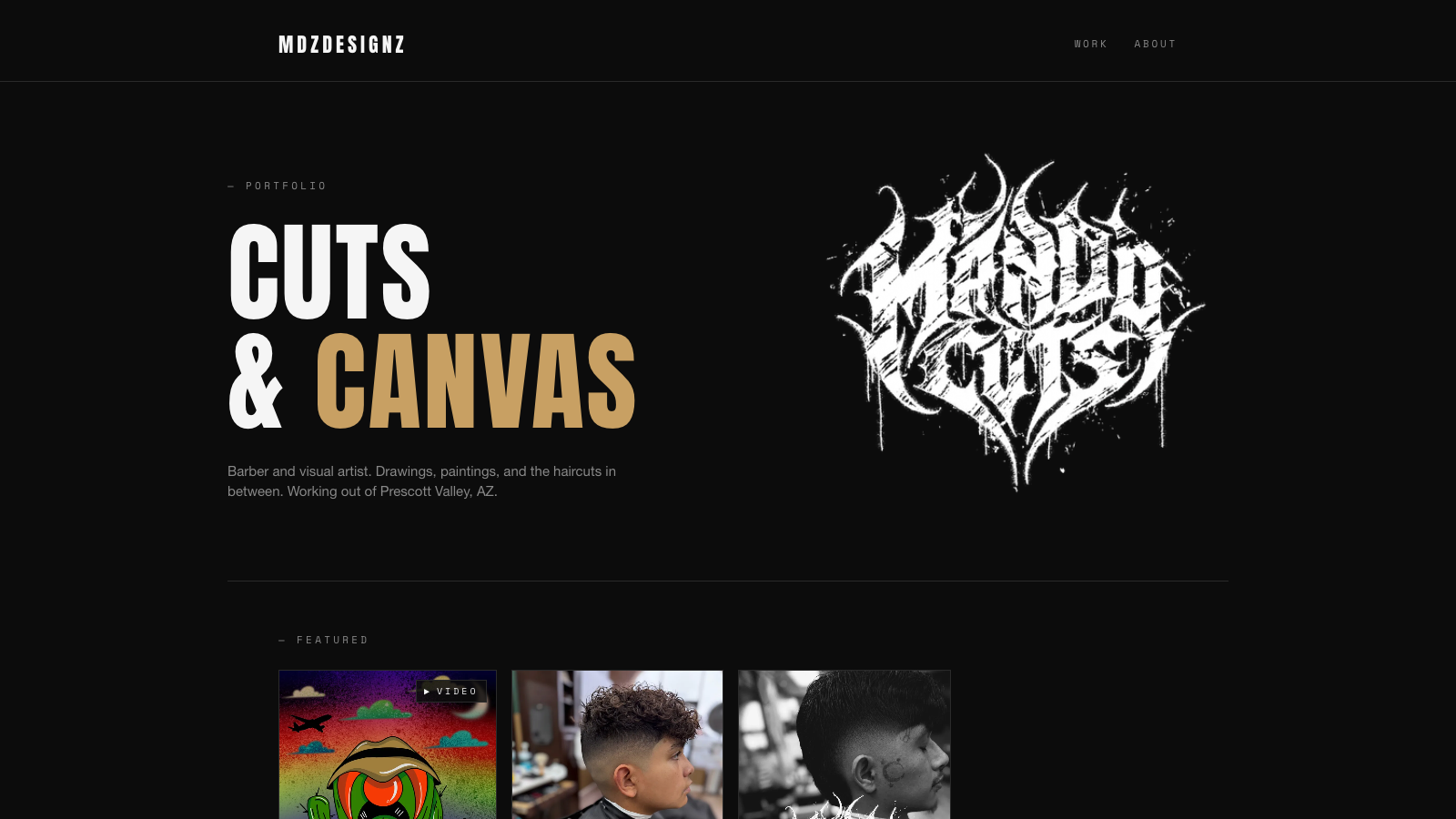
My brother Mando has been a barber since 2013, but the way he tells it, his story started with graphic design. Cutting hair just became his canvas. He’s been posting his work to Instagram for years and finally said the obvious thing: I should have a real site.
A real site meant a couple of things:
- A URL he can put on a business card without it being a username
- The ability to add new pieces himself, without texting me every time
That last part is where most portfolio builds go sideways. Developers build sites for non-developer creatives, the site looks great on day one, then a year later the artist has new work and the site still shows the same five pieces from the launch because updating it requires asking the developer.
I wanted to do this differently. The site is at mdzdesignz.com, and the interesting part isn’t really the design. It’s that I built it so he can run it himself.
What I Built
A dark editorial portfolio site that shows his drawings and barber work in one integrated stream. No separate “barber” and “artist” sections. He’s one creative person, and the site presents him that way.
Behind it, a tiny content manager he can log into from any browser, drop in new images, write a caption, and click publish. Sixty seconds later it’s live. No code touches involved.
The main pieces:
- Home page: hero with his logo and tagline, recent work grid, short bio
- Work archive: every piece he’s added, filterable by type (drawings, cuts)
- Single work pages: large image, title, date, optional description, prev/next nav between pieces
- About: bio + socials + where he’s based
- His admin page: the content manager (more on this below)
Total cost to keep this running: $0/month plus the domain. Cloudflare’s free tier covers the hosting, the content manager runs on Cloudflare’s free tier too, GitHub is free for private repos. The only recurring expense is the domain renewal, which is $9.99/year.
The Aesthetic Decision
This was the first real fork in the road. Mando sent me a Pinterest board labeled “barber portfolio” and said make it look like that. Which is useful only up to a point: Pinterest’s algorithm shows you a hundred different aesthetics under one label.
So before any code, I generated four directional mockups, each a fully styled homepage in a different visual neighborhood:
- A: Dark gritty editorial (tattoo studio / underground zine vibe)
- B: Vintage barbershop (heritage / Americana / classic stripes)
- C: Gallery minimalist (whitespace, light typography, fine-art portfolio)
- D: Bold streetwear (loud colors, oversized type, attitude)
Same content in each: logo, hero, sample work grid. Only the visual treatment differed. I sent him screenshots. He picked A in under a minute.
The lesson here, which I learned the hard way on previous projects: when a non-designer client asks you to “make it look good,” they usually have a clear preference but no language for it. Showing four real options (not Figma sketches, full styled previews) lets them point at the one that feels right. That conversation took ten minutes instead of three weeks.
A few days later, Mando sent me his actual logo: a black-metal/death-metal lettering treatment that reads “Mando Cuts” in dripping white ink on a transparent background. It dropped straight into the dark editorial direction and made it look ten times more like his site.
The Content Manager: The Real Trick
This is the piece that separates “I built him a site” from “I built him a site he can actually run.”
There’s a free open-source tool called Decap CMS (formerly Netlify CMS) that gives you a simple web admin panel for editing the content of a static site. It looks like the back-end of WordPress, but instead of storing content in a database, it commits changes directly to the GitHub repository that the site is built from. The site rebuilds automatically every time a change is committed.
For Mando, this means:
- He goes to his own admin page
- Clicks “Login with GitHub” (he has a GitHub account I created with him)
- Sees two collections: Work and Pages
- Clicks New Work, types a title, picks a date, drags an image in, writes a caption, hits Save
- About sixty seconds later, the new piece is live on the site
He doesn’t touch a terminal. He doesn’t see a single line of code. The fact that there’s a Git repository quietly receiving commits under the hood is invisible to him.
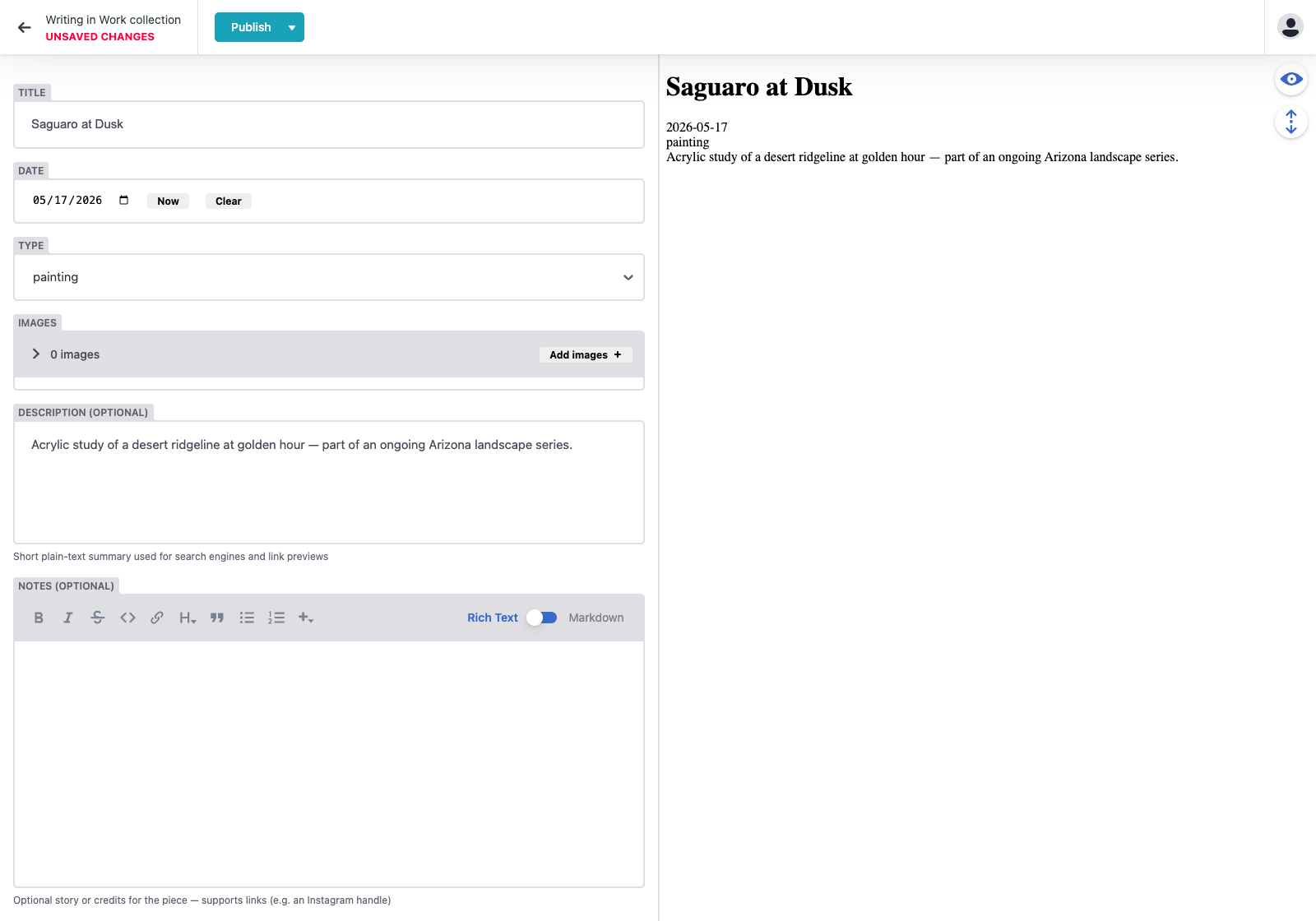
The form fields are exactly the things he needs to think about. “Type” is a dropdown with four options (painting / drawing / cut / other) so he can’t typo it. “Images” lets him drag and drop multiple files. “Featured on home” is a checkbox that controls whether the piece shows up on the homepage grid versus only in the full archive.
I spent a meaningful chunk of the build time getting this part right, because it’s the only part that matters for him long-term. The rest of the site he’ll see exactly once, when he first looks at it. The admin panel he’ll see every time he makes new work.
Designed for Hand-Off From Day One
Here’s where I did something I haven’t done on other builds: I designed this site to belong to him eventually, not to me.
Most projects I build live forever under my GitHub account, my hosting account, my domain registrar account. That’s fine when I’m building for myself. But this isn’t my site. It’s Mando’s. At some point he should own all of it directly.
So I made every layer transferable from the start:
- The GitHub repository is under my personal account, not under any of the umbrella organizations I use for my own products. GitHub lets you transfer a repository to another account with one click, and it preserves the entire history.
- The Cloudflare account is a brand new one, created under his own email address. It hosts only this one site and the small piece of code that powers the login. When I hand things off, I just give him the password to that Cloudflare account.
- The domain is registered under my account at Spaceship for now (I bought it during the build), but domains transfer easily between registrars. When he wants ownership, the transfer is a five-minute process.
That means the hand-off, whenever it happens, is roughly three transactions:
- Click “Transfer repository” on GitHub
- Hand him the Cloudflare account credentials
- Initiate the domain transfer at Spaceship
No “let me extract everything and rebuild it on your account.” No moving content. No reconfiguring the admin panel. The whole site moves as one piece because every piece was always meant to be his.
This idea, build it as if you’re handing it off, even if you’re not, is something I want to keep doing on future client work. It costs nothing extra during the build (in fact, it’s simpler because there’s no shared infrastructure to worry about). It just requires deciding upfront.
The Technical Bumps
A few things didn’t go smoothly the first time. Sharing them because they’re the kind of thing that’d waste somebody else’s evening if I didn’t.
The dependency conflict
I had the site building cleanly on my Mac. When Cloudflare tried to build it, it failed with a cryptic error about missing packages. The lockfile (the file that pins exact dependency versions) was technically valid on my machine but Cloudflare’s slightly stricter environment rejected it.
The cause: when I installed the test runner, I didn’t pin a specific version, so I got the latest. The latest test runner depended on a newer version of an internal tool, which conflicted with what the site framework needed. My machine tolerated the mismatch silently. Cloudflare’s didn’t.
The fix was pinning the test runner to an older major version that uses the same internal tool as the site framework. Five-minute fix once I understood it. Two builds and a confused stare to get there.
Lesson: for any project that has to build on a different machine than the one you wrote it on, always check that your lockfile passes npm ci (not just npm install) locally before pushing. The two commands behave differently: npm install is forgiving, npm ci is strict, and CI environments run npm ci.
The OAuth handshake
The login button for the content manager wouldn’t work. I’d click it, a GitHub popup would appear, I’d authorize, the popup would close, and the main page would just sit there like nothing had happened.
I’d implemented the standard “exchange code for token, post it back to the parent window” pattern. Worked on every other site that uses Decap. Didn’t work here.
The actual cause was buried in the Decap library: the popup is expected to do a handshake with the parent window before sending credentials. The popup must first send authorizing:github to the parent, wait for the parent to reply with the same string (confirming it’s listening), and only then send the actual token. The library does this to make sure the message is coming from a popup it actually opened, not from some random tab spoofing credentials.
My popup was skipping the handshake and just blasting the token across. The parent window saw the unsolicited message and ignored it. The popup closed, nothing happened.
Once I implemented the full handshake (popup says hello, parent says hello back, popup sends credentials), login worked instantly.
Lesson: when an integration looks like it’s failing silently, suspect that you’ve implemented “most” of the protocol but missed a small piece the other side requires. Documentation tends to gloss over handshakes because they’re invisible when they work.
Restricting who can log in
By default, the OAuth setup for a content manager lets anyone with a GitHub account complete the login flow. The actual data access is gated by GitHub’s permissions (strangers can’t write to a private repository even with a token), but the user experience is awful: anyone can click “Login with GitHub” on the admin page, authorize, and then sit there looking at a broken page trying to figure out why nothing loads.
So I added an allowlist at the login server itself. After exchanging the code for a token, the server fetches the GitHub user’s username and checks it against a configured list. If they’re not on the list, they get an error and no token. Currently only one username is on the list: mine. When Mando is ready to use it, I add him.
The allowlist lives as an environment secret on the login server, so I can update it without redeploying any code. Just rotate the secret.
How Long Did This Take
Two evenings of focused work plus a third half-evening for the final fixes after Mando reviewed it. Total time was maybe nine hours, including the back-and-forth on the aesthetic direction and waiting on his logo.
The actual code is mostly Claude Code (the AI coding assistant I use) generating from a detailed plan I worked out first. The planning takes longer than the typing. I’d say half the time was making sure I knew exactly what was being built before any code happened.
The pieces that weren’t AI-generated and that I had to actually think about:
- The aesthetic split (four directions, send screenshots, let him pick)
- The hand-off architecture (separate Cloudflare account, transferable repo)
- The CMS data model (one collection for work, a type field for filtering, a featured toggle)
- The decision to ship with placeholder content and let Mando fill it in via the CMS
Everything else was mostly executing a plan.
What’s Next for the Site
A few things are still placeholder:
- The favicon is a generic dark “MDZ” square; Mando will swap it for a real icon
- The default Open Graph image (the preview that shows up when someone shares the URL on social media) is a placeholder that needs a real card
- The actual content is three sample work entries; Mando will replace these as he uses the CMS
None of those are urgent. The site is live and functional. The CMS is working. He has a working login. The hand-off path is ready when he wants to take full ownership.
If you’re building something for someone non-technical and want it to actually outlive your involvement, I’d recommend the same shape:
- Pick proven, free, well-documented tools (Astro, Decap, Cloudflare Pages, GitHub) over anything custom-built or cutting-edge. “Boring” tools are the ones that’ll still work, and still be easy to find help for, years from now
- Build the content manager carefully. It’s the only piece they’ll see daily
- Architect for hand-off from day one. Even if you never hand it off, the discipline keeps your infrastructure clean
- Gate access at the auth layer. Don’t rely on “but the repo is private” as your only line of defense
You’re building something they can run. That’s the whole point.
Want to see what all of this was for? Mando’s portfolio is live at mdzdesignz.com, with drawings and barber work shown together in one place. He’s based in Prescott Valley, AZ, and posts new pieces on Instagram as @mdz_710. Go take a look, and if you like the work, tell a friend.
Some links on this page are affiliate links. I only recommend tools I actually use.